Pinterest Video Downloader – Download Pinterest Videos Online for Free
Download Pinterest videos, images, GIFs, and Idea Pins in a few simple steps. PinFlik is a free web-based tool that works directly in your browser—no app, registration, or software installation required. Simply paste the Pinterest link and save the content to your device.
VIDEO
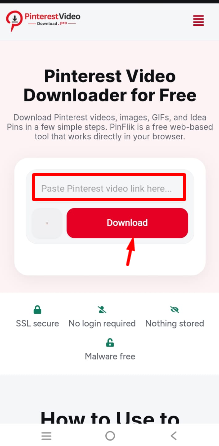
Pinterest Video Downloader for Free
Download Pinterest videos, images, GIFs, and Idea Pins in a few simple steps. PinFlik is a free web-based tool that works directly in your browser.
VIDEO
SSL secure
No login required
Nothing stored
Malware free
How to Use to Download Pinterest Videos
PinterestVideoDownload.pro is a fast and easy-to-use Pinterest downloader that helps you save Pinterest videos, images, GIFs, and Idea Pins online.
STEPS TO DOWNLOAD FROM MOBILE APP
1
Copy the pin link
In the Pinterest app, open the pin, tap Share, then Copy link.
2
Paste the Link & Download
Paste your copied Pinterest link.
We’ll prepare your file for download in seconds.
2
Download & Save
Your file is ready! Click Download to save the Pinterest video, image, Idea Pin to your device.
STEPS TO DOWNLOAD FROM DESKTOP
1
Copy the Pinterest Link
Open Pinterest and find the content you want to download.
Tap or click Share, then select Copy Link.
2
Paste the Link & Download
Paste the copied Pinterest link above and click Download. Your file will be ready in just a few moments.
3
Download & Save
Preview your file and click Download Now.
Your video, image, GIF, or Idea Pin will be saved to your device.
A Fast & Reliable Pinterest Downloader for Every Device
Download Pinterest videos, images, GIFs, and Idea Pins online.
Free to use, easy for everyone, and works on mobile and desktop.
High-Quality Downloads
Download Pinterest videos, images, GIFs, and Idea Pins in the best quality available from the original Pinterest post.
Supports Multiple Pinterest Content Types
Save public Pinterest videos, images, GIFs, Idea Pins, and carousel pins using one simple online tool.
Fast & Easy to Use
Copy the Pinterest link, paste it into PinterestVideoDownload.pro, and click Download. No app, registration, or technical knowledge required.
Works on All Devices
Use our Pinterest downloader on Android, iPhone, Windows, Mac, tablets, and all major web browsers.
Safe & Secure
Your privacy comes first. No login, no personal information, and no software installation required.
Free Online Pinterest Downloader
Enjoy unlimited downloads directly from your browser without creating an account or paying any fees.
What works, and what doesn't
No tool can do everything. Here is the honest list, so you do not waste time.
Works
Public video pins
Public boards and profiles
Reels and idea pins
Images and GIFs
pin.it short links
Doesn't work
Private pins
Secret boards
Invite-only boards
Anything behind a login
Deleted or expired pins
Is it safe to use?
Yes, and here is exactly why, not just a badge that says so.
No registration.
We never ask for your Pinterest login or any personal detail.
No fake buttons.
One tool, one download button, no pop-ups or redirect chains.
Nothing to install.
Everything runs in your browser. No app, no extension needed.
Links are forgotten.
Files go straight from Pinterest servers to your device.
No. Only public pins work. Private pins, secret boards and invite-only boards cannot be accessed.
Legal & Service Information
PinterestVideoDownload.pro is a free online tool that helps users download publicly accessible Pinterest videos, images, GIFs, and Idea Pins for personal use. Please respect copyright laws and the rights of content creators before downloading or sharing any media.
Service Information
PinterestVideoDownload.pro is an independent website and is not affiliated with, sponsored by, endorsed by, or officially associated with Pinterest, Inc. Pinterest® is a registered trademark of its respective owner.
We encourage users to download only content they have permission to use or content that is available for personal, non-commercial purposes. You are responsible for ensuring your use of downloaded media complies with applicable copyright laws and Pinterest’s terms.
Before using this website, please review our Terms & Conditions and Privacy Policy. By continuing to use PinterestVideoDownload.pro, you agree to these policies.
PinterestVideoDownload.pro does not store, upload, archive, or host any Pinterest content on its own servers. When you submit a Pinterest link, our tool retrieves publicly available media directly from Pinterest’s servers and prepares it for download.